Reference / Wi-Fi
Wi-Fi: what the name means and what to check
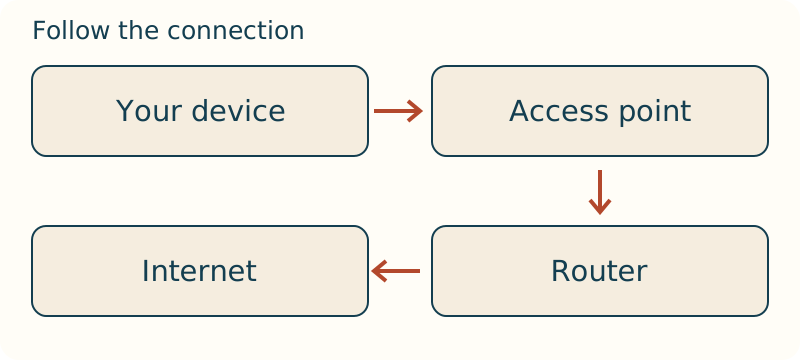
Wi-Fi is commonly used for local wireless networking built around IEEE 802.11 technologies. It is not a synonym for the internet: Wi-Fi is the local radio connection, while internet access is only one possible service behind it.
Standards and real networks
IEEE 802.11 specifies wireless LAN MAC and PHY behaviour. A product label and a standards family answer different questions; confirm the capabilities of the exact devices being connected. Compatibility also depends on security settings, client capability and the wired network behind the access point.
Headline data rates are capacity ceilings, not promises to every client. Airtime is shared, and obstacles, channel use and older clients change the result. Survey intended rooms instead of selecting equipment from one speed number alone.
Make access manageable
Use a separate administrator credential, software whose maintenance status has been checked for the deployment, and a guest network when visitors do not need local devices. Keep recovery details before changing security settings.
Troubleshoot in order: joining the local network, receiving an address, reaching local services, then reaching the upstream connection. This prevents resets from hiding the real fault.
Change settings safely
Change one variable at a time and note the previous value. Channel, security and network-name changes can affect every client, so schedule them when recovery is possible.
Afterward, test an intended client, any older required client, a guest client and a local service. This checks compatibility rather than merely proving that one administrator device works.
Separate association from the internet path
Wi-Fi is the local wireless link, not the path to every service beyond it. A client can discover a network, associate with the access point and still be unable to reach anything useful. After association, the client needs network configuration, a route through the local network and successful access to the intended service. Treating the signal icon as an internet test combines several independent steps into one misleading indicator.
Follow one client in order: can it see the expected network, join it, obtain an address, reach the local gateway, resolve the intended name and complete the application action? Stop at the first failed step. A device that receives an address but cannot reach the gateway does not need the same investigation as a device that reaches the gateway but fails only on one service. This sequence turns a vague complaint into a bounded test.
Place the access point for the people using it
An access point is evaluated where people use the network, not where it is most convenient to hide equipment. A cupboard, cabinet or far corner can add material between the antenna and the client; a clear central location gives a different starting condition. The relevant rooms may have different wall layouts, nearby radios and patterns of human occupancy, so a result in a hallway is weak evidence for a desk or bedroom.
Make a small location plan before changing settings. Mark the intended work areas, the access-point position, the wired uplink and locations where the task matters. Test the same client and application in those areas. If a room is weak while a nearby open area works, moving the access point or changing the physical path is a distinct experiment from changing the channel. Do not combine both and then attribute the result to one of them.
Interpret speed as shared airtime
Wireless clients take turns using the shared medium. A negotiated link rate describes a radio relationship at a moment; it is not a private throughput reservation for that client. Distance, retries and competing traffic consume time on the medium, so a slow or struggling client can affect the usable result for others. This is why a high number shown by one nearby device does not settle the experience of devices elsewhere.
When performance is the symptom, repeat one application-relevant transfer with the same client, location and time window while noting other activity. Compare a nearby client with the affected one, then compare the affected client when the surrounding load differs. The aim is not to assign blame from one speed result; it is to learn whether the limitation follows location, client or shared use. That distinction informs whether placement, client compatibility or capacity is the next decision.
Make access roles visible in the network design
Ordinary use and administration should not be the same role. A person connecting a phone needs access to the intended service; a person changing network settings needs a separately controlled management path. Keeping those roles distinct limits the consequences of a widely shared household or visitor passphrase. It also makes configuration changes easier to trace because management access is not mixed with routine client traffic.
Guest access is a second trust decision, not merely a second name. Define what a guest should be able to reach and what must remain unavailable, such as personal devices or management interfaces. Then test both outcomes from a guest client: confirm that the intended service works and that the protected local path does not. A label alone does not establish isolation; the actual reachable paths do.
Troubleshoot without erasing the comparison
Before rebooting or resetting, capture the state that makes the problem useful: the client, location, selected network, time and first failed step. Test a known-good client near the access point and repeat in the affected room. If a wired client has the same upstream failure, the local radio is not the only suspect. If the wired path succeeds and only the distant wireless test fails, the radio path becomes a stronger candidate for the next check.
Change one reversible element, then repeat the same task. A reset can restore service temporarily while deleting the settings and observations needed to explain why it failed. Keep a known management route and a recovery method before changing network identity or security settings. The result is a defensible decision: retain a working arrangement, reverse an unsuccessful change, or move to the next boundary with evidence rather than a fresh guess.